
A shopper in Turkey asks an assistant: "If I buy this phone in 6 installments, what do I pay per month, and is there interest?" The question is about price, but the answer isn't in the price field. On many Turkish stores, the installment table appears in a tab near the bottom of the page once the payment provider's widget loads. A person opens the tab and reads it. An agent that reads the HTML often sees an empty box.
In this article, we look at where installment information reaches an agent, what Google offers for installments and how Turkish stores can make this information readable.
Why installments are part of the agent's answer
In Turkey, installments (taksit) are part of the buying decision. "3 installments at the cash price", "6 interest-free installments" or "9 installments with interest" can set one offer apart from another. An agent that sees only the cash price when it compares two stores misses half of the comparison, and can't answer when the shopper asks for the monthly amount.
Where installment information reaches an agent

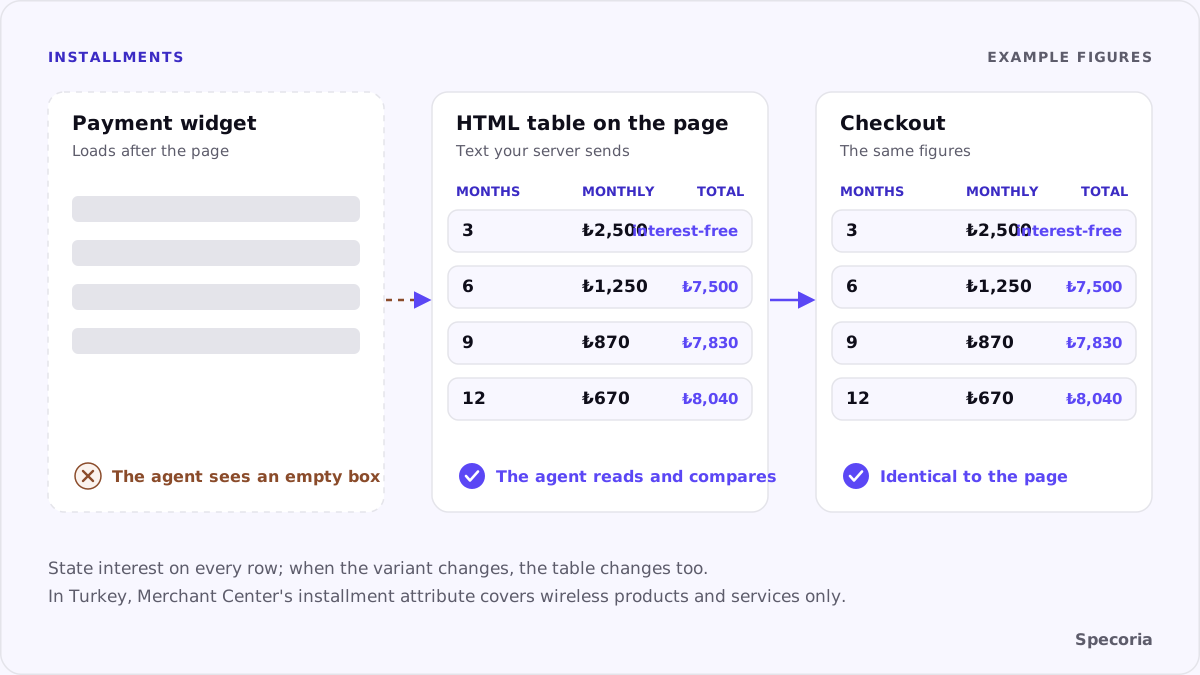
On the page itself. If the installment table is text in the HTML, any agent that reads the page can read it. If it only loads later from another service through a script, it may not.
In Merchant Center. Google Merchant Center's installment attribute carries the number of installments (months), the monthly amount (amount) and an optional down payment (downpayment). According to Google's help page, though, the attribute is available for all product categories only in a few Latin American countries. In certain other countries, Turkey among them, it is available only for showing wireless products and services, such as mobile phones, laptops, tablets and watches. A phone retailer can put installments in its feed; a furniture retailer can't.
In structured data. Schema.org has no widely used field that describes installments directly. Schema.org says billingDuration on a UnitPriceSpecification can be used to model the duration of a payment plan, but whether agents read it isn't documented. So the page text has to carry the information.
An installment table an agent can read
What to do: put the installment options on the product page, in the HTML your server sends, as a plain table:
- The card program or bank, the number of installments, the monthly amount and the total, each in its own column.
- Whether there is interest, stated on every row: "interest-free" or "total: …".
- Figures calculated for the same product and variant as the cash price; when the variant changes, the table changes too.
- Any validity condition, with a date or campaign name.
You don't need to remove the payment provider's widget. A short summary generated on the server next to it is enough: "3 installments at the cash price; 6 installments at ₺1,250 a month, ₺7,500 in total."
Consistency: page, feed and checkout
The installment table has to say the same thing in three places: on the product page, in the Merchant Center feed where it applies, and at checkout. If the product page says "6 interest-free installments" and checkout adds interest, the agent has passed a wrong promise to the shopper. We explained why price consistency matters in your feed, your page and your structured data should agree on price; installments are part of the price.
Common mistakes
- Installments only in an image: a banner saying "9 installments" carries no information for an agent.
- One generic table for every product, not calculated for the product's price.
- A tab that shows nothing but "click for installment options".
- Campaign installments with no end date.
- Different figures on the page and at checkout.
The bottom line
In Turkey, the price question is often an installment question. Because Google's feed attribute for installments covers only wireless products and services in Turkey, for most categories the product page itself is how installment information reaches an agent. Put the installment table in the HTML as text, state interest clearly and keep the figures identical to checkout.
Specoria checks whether your product name and price are readable without JavaScript and whether prices agree between your page, your structured data and your feed. Start with a free readiness test.
Sources
- Google Merchant Center Help, [Installment [installment]](https://support.google.com/merchants/answer/6324474), accessed October 22, 2026.
- Schema.org, UnitPriceSpecification, accessed October 22, 2026.
- Specoria Insights, Your feed, your page and your structured data should agree on price