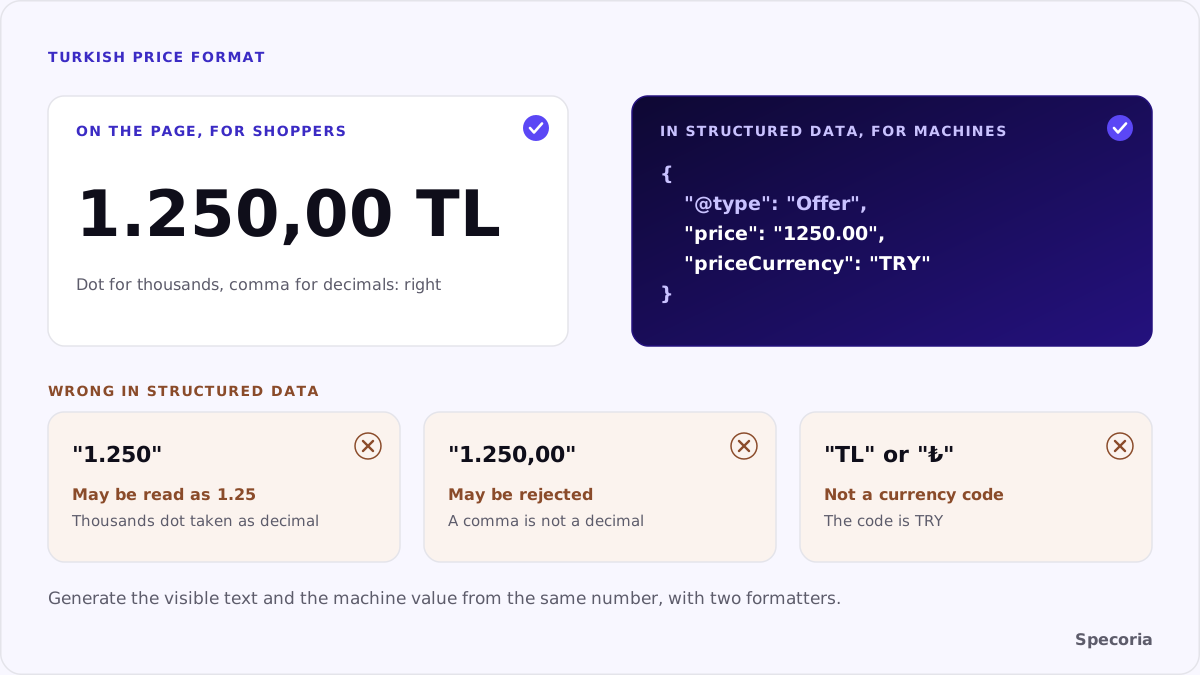
Your product page shows the price as "1.250,00 TL". To a Turkish shopper, that is one thousand two hundred and fifty lira. If the same text was copied into your structured data, a program reading it faces a question: is the dot a decimal point or a thousands separator? A parser may read it as 1.25, or reject the field. An agent comparing two stores that thinks your price is one lira twenty-five, or can't read it at all, leaves you out of the comparison.
In this article, we look at why the Turkish price format that is right for people is wrong for machines, what schema.org and product feeds expect and how to keep both formats side by side.
Two formats, two readers
Turkish uses a dot as the thousands separator and a comma as the decimal separator: "12.499,90 TL". The visible price on the page should stay that way; shoppers expect it.
Values written for machines expect one international format. Schema.org's definition of price is explicit:
- Use a dot (
.), not a comma, as the decimal point. - Don't use these symbols as readability separators, so no thousands separator.
- Instead of ambiguous symbols such as
₺or$in the value, give the currency separately inpriceCurrencyas an ISO 4217 code (TRY). - Use the standard digits 0 to 9, not look-alike Unicode characters.
So on the page "12.499,90 TL", in structured data "price": "12499.90", "priceCurrency": "TRY".
Feeds expect the same format
Google Merchant Center's price attribute is a number plus a currency, using ISO 4217; its example is 15.00 USD. OpenAI's product feed spec asks for amounts like 79.99 USD: a decimal point, no thousands separators, no exponent notation and an uppercase three-letter currency code. For Turkish lira, that means 1250.00 TRY, not "1.250,00 TL".
Common mistakes
- Copying the visible price. The theme prints the formatted text into structured data:
"price": "1.250,00". - Leaving the thousands dot.
"price": "1.250"may be read as one point two five, not one thousand two hundred and fifty. - "TL" or "₺" as the currency. The ISO code is
TRY; "TL" is not a code. - A symbol inside the price.
"price": "₺1250". - Dropping the decimals. "1.249,90 TL" on the page becoming
1249in structured data, which creates a price mismatch between page and markup. - A price of 0 for out-of-stock products. The price isn't zero; the availability is
OutOfStock.
The right setup
- Generate the price from one numeric field. Write the visible text and the machine value from the same number with two different formatters; never copy one from the other.
- In structured data:
pricewith a dot decimal and no thousands separator,priceCurrencyasTRY. - If you use microdata, schema.org notes you can put the machine value in a
contentattribute next to the human-friendly format. - In feeds: the
1250.00 TRYformat. - Keep tax status consistent. If the page shows a price including VAT, the structured data and the feed carry the same amount.
- The same rule applies to installment, sale and member prices: every machine value with a dot decimal.
Where the wrong format comes from
The visible price is rarely the problem. The machine value usually goes wrong in one of these places:
- The theme. A template prints the already formatted price into the JSON-LD block.
- A plugin or app that builds structured data from the display string instead of the stored number.
- Spreadsheets. A product export opened in a spreadsheet with Turkish regional settings can turn
1250.00into1.250,00on save, and the feed is uploaded from that file. - Manual edits. A price typed by hand into a feed or a markup field, in the format the person is used to.
Fix it at the source: the platform stores a number; every output, visible or machine, formats that number for its reader. Google's Rich Results Test shows the price it parsed from your page, which is a quick way to see what a machine reads.
A ten-minute check
- Open the source of five product pages and find the
"price"values. - Check that any dot is used only as the decimal point, with no comma, space or symbol.
- Confirm
priceCurrencyisTRY. - Compare the value with the price on screen, down to the kuruş.
- Check the same products in your feed for the
1250.00 TRYformat.
The bottom line
"1.250,00 TL" is right for a shopper and wrong for a machine. Both can live on the same page: the visible price in Turkish format, the structured data and the feed with a dot decimal, no thousands separator and the TRY code. That small distinction stops an agent from thinking your price is a thousand times lower, or from not reading it at all.
Specoria checks whether price, currency and availability are present in your structured data and consistent between your page, markup and feed. Start with a free readiness test.
Sources
- Schema.org, price and priceCurrency, accessed October 22, 2026.
- Google Merchant Center Help, [Price [price]](https://support.google.com/merchants/answer/6324371), accessed October 22, 2026.
- OpenAI, Product Feed Spec, accessed October 21, 2026.