A shopper asks an agent for the cheapest place to buy a particular phone model. Your store has it at 60% of the usual price because it is refurbished. If your data says so, the agent can present it as a refurbished option with a warranty. If it doesn't, the agent either compares it with new phones and calls it the best deal, or decides the price is too good to be true and leaves it out.
Condition is a small field with a large effect on comparison. In this article, we look at how Google and schema.org define condition, what a refurbished or used listing should state and the mistakes that make good offers look suspicious.
Three values, three meanings
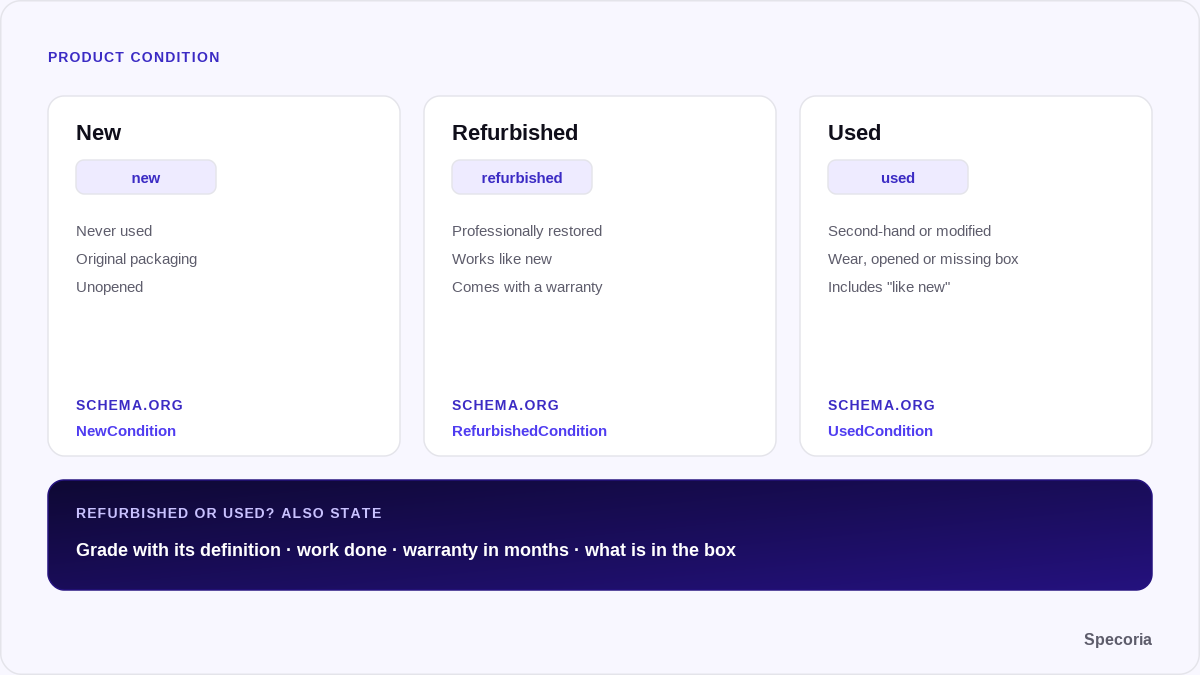
Google's Merchant Center help defines the condition attribute with three values:
- New: never used, in its original packaging, unopened.
- Refurbished: not new, but professionally restored to working order so that it appears new, and comes with a warranty. It may or may not be in its original packaging; it is sometimes called "remanufactured".
- Used: second-hand or modified from its original condition, for example showing wear, opened or missing packaging, or customized.
condition is optional for new products and required for used and refurbished ones. In structured data it maps to schema.org's itemCondition: NewCondition, RefurbishedCondition, and UsedCondition or DamagedCondition for used.
Note the line Google draws: "refurbished" means professionally restored and with a warranty. A phone that was only cleaned and reset is used, not refurbished.
What a refurbished or used listing should say
The condition value tells an agent which group the product belongs in. The page has to answer the questions that follow:
- Grade or cosmetic state, with a definition: "Grade A: no visible scratches at arm's length".
- What was done: battery replaced, parts tested, data wiped.
- Warranty: who gives it and for how long, in months.
- What's in the box, and what isn't: charger, cable, original packaging.
- Return terms, if they differ from new products.
Put these in text near the price, and in the title for the most important one: "Phone X, 128 GB, refurbished, grade A".
The same product, three offers
Stores that sell the same model new and refurbished should treat them as separate products: separate URLs or variants, separate offers with their own price and availability, and the same GTIN only where the condition value makes the difference clear. An agent that sees two prices for one GTIN with no condition will assume one of them is wrong.
Returns and condition
Condition also matters after the sale. Schema.org notes that itemCondition is used in return policies too, to specify the condition of products accepted for returns. If your returns for used or refurbished items work differently, for example a shorter window or no returns on opened items, say so in your return policy markup and on the product page. An agent asked "can I return it?" should get the answer for this item, not the general one.
A checklist
- List every refurbished and used product and set its condition value.
- Check that refurbished items really come with a warranty; if not, mark them used.
- Define your grades once, on a page you link from every listing.
- Add warranty length and box contents to each listing.
- Check that structured data carries the same condition as the feed.
Common mistakes
- No condition on refurbished stock, so it is compared with new products.
- "Like new" used as a condition value; it isn't one.
- Refurbished without a warranty, which by Google's definition is used.
- Condition only in the title, not in the data or the markup.
- Grades without definitions: "Grade B" means nothing without a description.
The bottom line
Condition decides which products an agent compares yours with. State it in your data and markup with the standard values, and on the page say what the grade means, what was done and what the warranty covers. Then a refurbished price reads as a fair offer, not a mistake.
Specoria checks whether your offers carry complete structured data and whether page, markup and feed agree. Start with a free readiness test.
Sources
- Google Merchant Center Help, [Condition [condition]](https://support.google.com/merchants/answer/6324469), accessed October 23, 2026.
- Schema.org, itemCondition, accessed October 23, 2026.