A shopper asks an agent whether a ceramic mug is dishwasher safe and whether it holds 400 ml. Your description opens with three sentences about your brand's love of craft, continues with your returns policy and ends with "AMAZING QUALITY!!!". The capacity is in the photo. Dishwasher safety isn't mentioned anywhere. The agent answers from a competitor's page.
Descriptions are where agents look for answers to the second and third questions. In this article, we look at what makes a description quotable, what Google's Merchant Center rules say and a template you can apply across a catalog.
What agents do with a description
Agents rarely show your description in full. They extract from it: a material, a dimension, a care instruction, a compatibility note. That changes what a good description is. It isn't the one that persuades best; it is the one where each fact can be lifted out as a sentence and still be true and clear on its own.
What Google's rules say
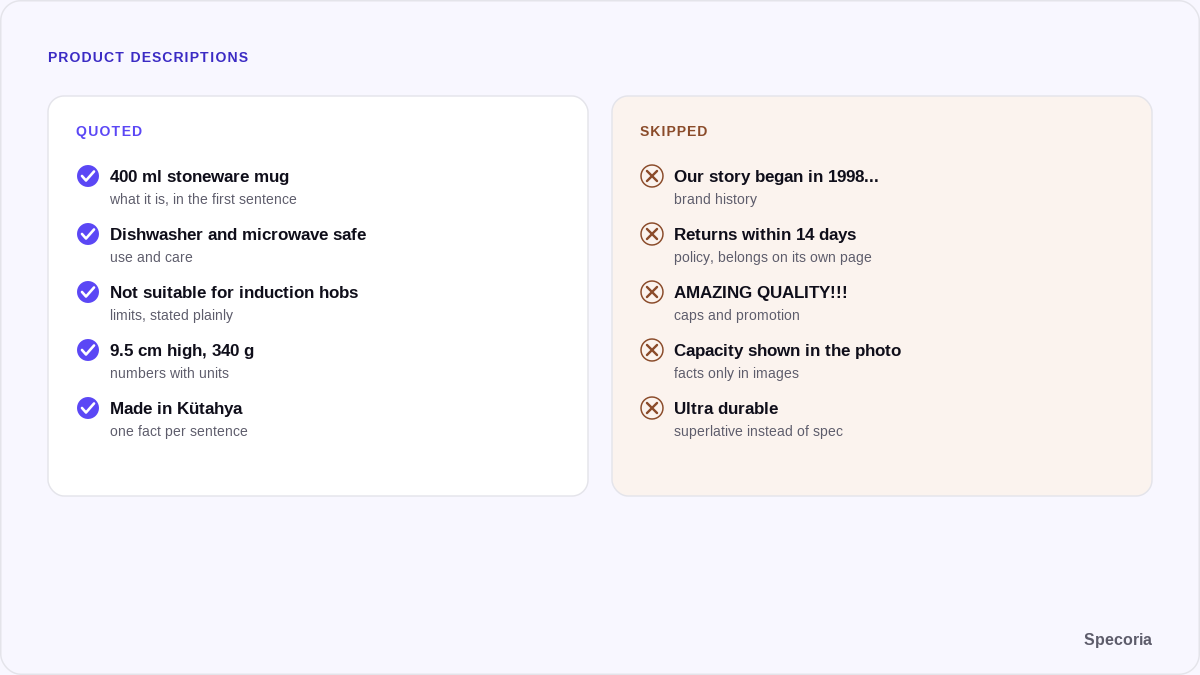
Google's Merchant Center help for the description attribute asks for:
- Only the product itself. Don't describe compatible products, accessories or similar items, and don't include your business history or policies.
- Consistency with the title, the rest of your data and the landing page.
- Professional, grammatically correct language, without all caps, symbols or promotional text.
- The data source's language, without gimmicky foreign words or characters.
- Length: 1 to 5,000 characters; longer descriptions are truncated.
As with titles, Google has a structured_description attribute whose digital_source_type can be set to trained_algorithmic_media for descriptions created with generative AI.
A template that works for agents
- One sentence that says what it is and who it's for. "A 400 ml stoneware mug for hot drinks, made in Kütahya."
- Key facts as short sentences or a list: material, dimensions and weight, capacity, compatibility, what's in the box.
- Use and care: dishwasher, microwave, washing temperature, assembly.
- Limits stated plainly: "Not suitable for induction hobs." Agents need negatives as much as positives.
- Nothing that belongs elsewhere: shipping, returns and brand story go on their own pages, linked.
Write numbers with units, keep one fact per sentence, and use the same words the shopper would: "dishwasher safe", not "suitable for automated cleaning".
If you use AI to write descriptions
AI drafting is fine if a person checks the facts. The risk is specific: a model fills gaps with plausible details, such as a material, a certification or a capacity, that aren't true for your product. An agent will then repeat the invented fact as yours. Generate from your product data, not from the title alone; review before publishing; and if you use Google's feed, say so with structured_description.
Where descriptions go wrong at scale
Most description problems aren't written by hand. They arrive through the pipeline:
- Supplier feeds that bring the manufacturer's text for a different version or market.
- Copy and paste from a similar product, with the old capacity left in.
- Machine translation that turns "dishwasher safe" into something no shopper would search for.
- Template blocks that add the same shipping paragraph to every product.
Fix the pipeline rather than the pages: one product data source, descriptions generated from its fields where possible, and a review step before anything is published.
Common mistakes
- Brand story first, product facts last or missing.
- Facts only in images: dimensions in a diagram, care in an icon row.
- One description for many products, with the wrong capacity for half of them.
- Superlatives instead of specs: "ultra durable" instead of "18/10 stainless steel".
- Copied manufacturer text that describes a different version.
The bottom line
A description is a source of answers. Put the product's facts first, one per sentence, with units and limits, and leave policies and promotion to the pages that hold them. Then when a shopper asks the agent a specific question, the answer it quotes is yours.
Specoria checks whether your product pages carry a description and images in their structured data, and whether key facts are readable without JavaScript. Start with a free readiness test.
Sources
- Google Merchant Center Help, [Description [description] and structured description [structured_description]](https://support.google.com/merchants/answer/6324468), accessed October 23, 2026.
- Specoria Insights, How to make product pages machine-readable