
A shopper asks an agent to find the cheapest place to buy a specific pair of headphones. Twelve stores sell them. The agent has to be sure that the headphones on your page are the same product as the ones on the other eleven: same model, same color, not a refurbished unit or a different generation. The most reliable way to know is a shared identifier.
We introduced product identifiers in our catalog guide. In this article, we go deeper into the GTIN: what makes one valid, the mistakes that break matching and how to check your catalog.
Why identifiers decide matching
Names vary from store to store: "Wireless headphones X200 black", "X200 BT kulaklık siyah", "Headphones, model X200". A GTIN doesn't. When two offers carry the same valid GTIN, an agent can treat them as the same product and compare price, stock and delivery. When one offer has no GTIN, or a wrong one, the agent has to guess from the name, or leave you out of the comparison.
Google puts it in terms of performance: products with a GTIN assigned by the manufacturer should include it, and including it "can increase the performance of the product".
What a valid GTIN looks like

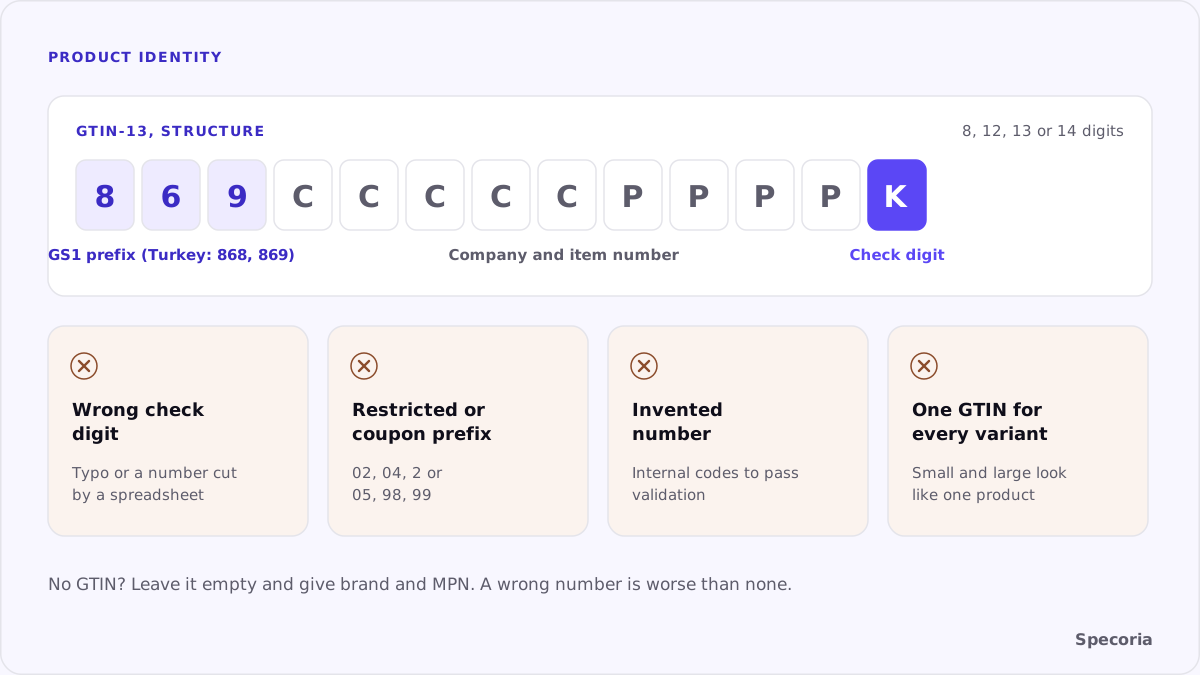
According to Google's Merchant Center help:
- Length. 8, 12, 13 or 14 digits: UPC, EAN, JAN or ISBN. Spaces and dashes are accepted but ignored.
- Check digit. The last digit must be present and correct, calculated as GS1 defines it.
- Restricted ranges. Don't submit GTINs starting with 02, 04 or 2; those are restricted.
- Coupon ranges. Don't submit GTINs in the coupon ranges, with prefixes 05, 98 or 99.
- Only real ones. Don't submit a GTIN for a product that doesn't have one.
- In structured data, the matching schema.org properties are
gtin8,gtin12,gtin13,gtin14andisbn.
The mistakes that break matching
- A wrong check digit. Often a typo or a number cut off by a spreadsheet. The number then belongs to no product.
- An invented number. Some catalogs fill the field with internal codes or made-up numbers to pass validation. That is worse than leaving it empty, because it creates a false match or none.
- One GTIN for every variant. Each size and color usually has its own GTIN. Putting the parent's number on every variant tells the agent that the small and the large are the same product.
- The wrong product's GTIN. A copied product page that kept the original's number.
- A GTIN only in the feed. The page and its markup don't show it, so an agent reading the page can't confirm the match.
- Leading zeros lost. A 12-digit UPC stored as a number in a spreadsheet loses its leading zero and becomes an 11-digit number that matches nothing.
When there is no GTIN
Handmade products, your own private label without registered numbers or custom items may have no GTIN. Then don't invent one. Google says you may be required to submit the brand and MPN instead: the manufacturer part number together with the brand identifies the product. For your own products, the MPN is your own stable model code, the same on every channel.
What the match makes possible
Once an agent is sure two offers are the same product, it can do more than compare prices:
- Pool what it knows. Specifications, reviews and questions answered elsewhere can inform the answer about your offer.
- Compare the whole offer. Stock, delivery time and return terms side by side, not just the price.
- Recommend you as an alternative when another store is out of stock.
Without the match, your offer stands alone, and an agent that can't confirm what it is has little reason to recommend it.
Where to put the GTIN
Put it in three places, identical in each: the product's structured data (gtin13 or the matching property, on each variant's offer), your product feed and, if your customers care about it, as visible text such as "Barcode" in the product details. The structured data is what lets an agent confirm the match from the page itself.
A one-hour check
- Export your catalog and list every GTIN.
- Check the length (8, 12, 13 or 14 digits) and the check digit with a GS1 calculator or a script.
- Flag numbers starting with 02, 04, 2, 05, 98 or 99.
- Find duplicates: the same GTIN on two different products or on every variant of one product.
- Open five product pages and confirm the GTIN appears in the structured data and matches the feed.
- For products without a GTIN, confirm brand and MPN are filled in instead.
The bottom line
An agent compares your offer with others only if it can be sure the product is the same. A valid GTIN, one per variant, in the page and in the feed, gives it that certainty. Invented, shared or mistyped numbers take it away, and an empty field with a brand and MPN is better than a wrong number.
Specoria checks whether your product pages carry identity data (GTIN or MPN, brand and SKU) in their structured data. Start with a free readiness test.
Sources
- Google Merchant Center Help, [GTIN [gtin]](https://support.google.com/merchants/answer/6324461), accessed October 22, 2026.
- Specoria Insights, How to prepare your product catalog for shopping agents