A shopper asks an agent for the cheapest place to buy a particular camera. One store sells it for 900, another for 1,100. The second price includes a lens and a bag; the first is the body only. If neither store says so in its data, the agent compares a camera with a camera kit and recommends the wrong deal, or distrusts both.
In this article, we look at how bundles and multipacks confuse comparisons, what Google's Merchant Center rules say and how to describe them so an agent compares like with like.
Three things that look alike
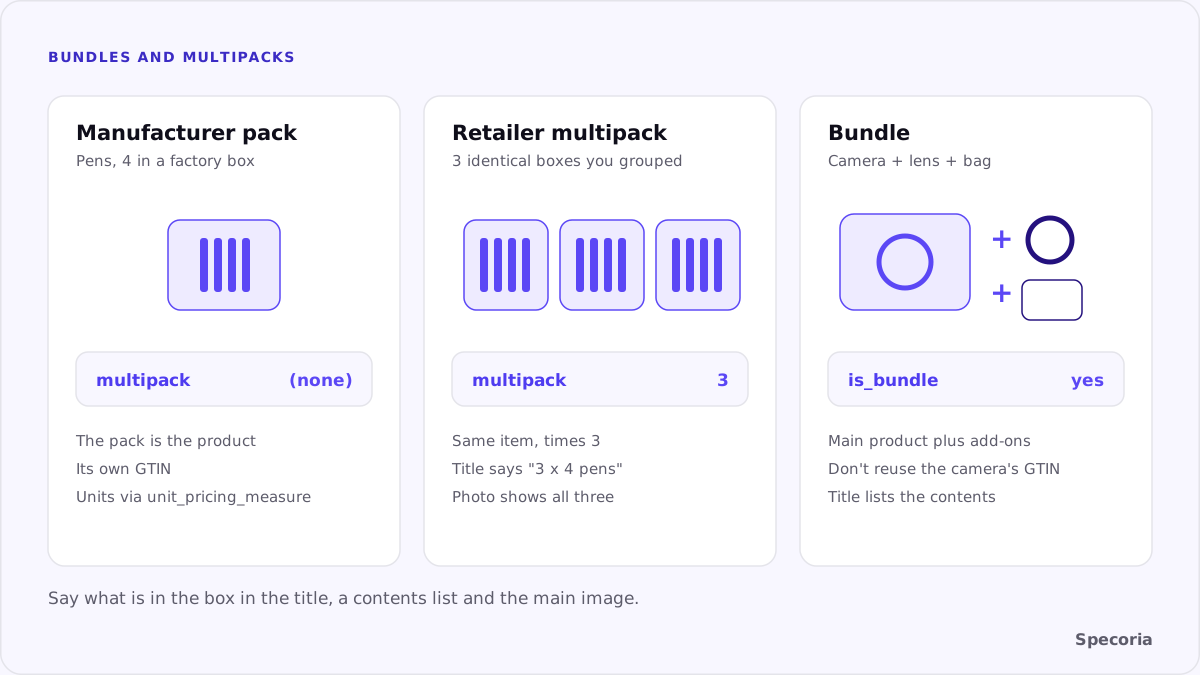
- A manufacturer's pack. The pens come in a box of 4 from the factory. That is the product.
- A retailer's multipack. You put 3 identical boxes together and sell them as one item.
- A bundle. You sell a main product with different add-ons for one price: a console with three games, a camera with a lens and a bag.
To a shopper looking at a photo, the difference is visible. To an agent reading data, it exists only if you write it down.
What Google's rules say
According to Google's Merchant Center help:
multipackis for multiple identical products that you, the retailer, have grouped together. Submit how many you grouped: 3 pens, or three 20-packs of pens, are both a multipack of 3. Don't use it for a manufacturer's multipack; for that, Google points tounit_pricing_measureif you want to state the number of units.is_bundleis for a custom bundle you created that includes a main product plus different products, such as a camera with a lens and a bag. If you don't submit it, the default is no. Don't use it for a bundle the manufacturer created.- Describe the whole bundle. Google's best practices say the image, title and description should reflect the entire bundle.
Both attributes are required for free listings when they apply, and for Shopping ads in a list of countries Google names.
Saying it on the page
Merchant Center attributes cover one channel. An agent reading your page needs the same facts in text:
- The title says what's in it: "Camera X, body + 24-70 mm lens + bag", "Socks, 3 pairs".
- A contents list, one line per item, with quantities.
- A unit price where it helps comparison: price per pair, per 100 ml, per piece.
- One GTIN where it applies. A manufacturer's pack has its own GTIN; your own bundle usually doesn't, so don't reuse the main product's number. We covered why in GTIN mistakes that stop an agent matching your product.
Unit prices make packs comparable
A 3-pack at 270 and a single at 99 are only comparable per unit. Showing "90 per pair" next to the pack price lets an agent, and a shopper, see the deal at a glance. Google's multipack help points the other way for factory packs: if a manufacturer's pack has a number of units, it suggests unit_pricing_measure to state them, rather than calling it a multipack. Either way, the aim is the same: give the comparison a common unit.
Common mistakes
- The main product's GTIN on the bundle, so the bundle matches the bare product and looks overpriced.
- A photo of one item for a pack of three.
- Quantity only in an image or in the variant name "Option 2".
multipackused for a factory 4-pack, which tells Google you made a pack you didn't.- Bundle contents in a tab loaded by a script, invisible to an agent reading HTML.
A checklist
- List every product that is a pack or a bundle.
- For packs you assembled, set
multipackto the number of identical items; for the factory's own packs, leave it out. - For bundles you assembled, set
is_bundleto yes and remove the main product's GTIN from the bundle. - Rewrite titles so they state the contents and quantity.
- Add a contents list and, where it helps, a unit price on the page.
- Make sure the main image shows the whole pack or bundle.
The bottom line
Price comparison only works when the products being compared are the same. A bundle, a retailer's multipack and a manufacturer's pack are different things, and an agent can only tell them apart from your data. Mark them in your feed, say what's in the box on the page and keep identifiers honest, and the agent compares your offer with the right ones.
Specoria checks whether your product identity data and structured data are complete and consistent with the page. Start with a free readiness test.
Sources
- Google Merchant Center Help, [Multipack [multipack]](https://support.google.com/merchants/answer/6324488), accessed October 22, 2026.
- Google Merchant Center Help, [Bundle [is_bundle]](https://support.google.com/merchants/answer/6324449), accessed October 22, 2026.
- Specoria Insights, GTIN mistakes that stop an agent matching your product