A shopper asks an agent for running shoes in size 42 that fit a wide foot. Two things have to be true before the agent can answer. It has to know your shoe comes in a 42 in the same size system the shopper means, and it has to find something about width or fit. If your sizes live in a dropdown built by a script and your size chart is an image, the agent has neither.
In this article, we look at how sizes reach an agent, what Google requires for apparel and shoes and how to publish fit information an agent can repeat.
Why size is the first filter
For clothing and shoes, size is usually the first filter after the product type. An agent that can't confirm a size is available has to either skip the product or send the shopper to check, which is the friction they were trying to avoid. "Will it fit?" is the natural follow-up, because a wrong size means a return.
What Google requires
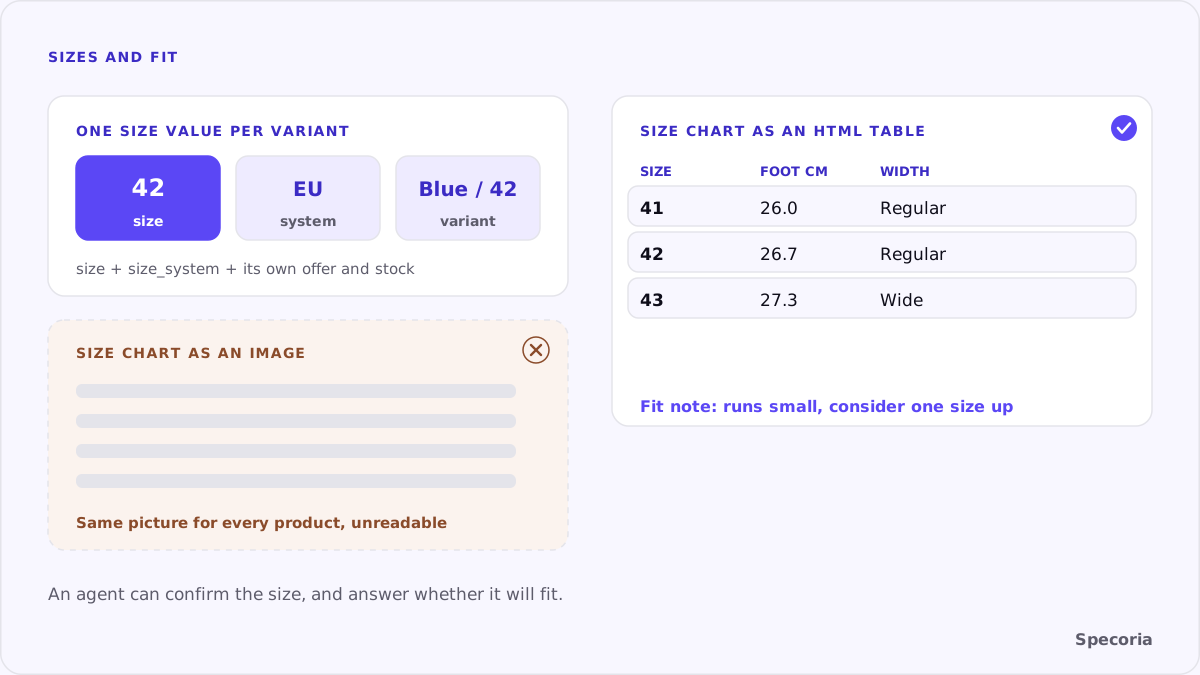
According to Google's Merchant Center help, the size attribute is required in free listings for all products in Apparel & Accessories > Clothing and > Shoes. The rules:
- One standard size value per product, for your target country. If you send several, only the first is used.
- Each size is its own product, submitted as a separate variant that shares an
item_group_idwith the others. - Only the size. Don't send "n/a", "none" or "multisize", and put color, material and pattern in their own attributes.
- Several dimensions in one value with a slash, such as
16/34, not separated by commas. - Name the size system with
size_system: the supported values are AU, BR, CN, DE, EU, FR, IT, JP, MEX, UK and US.
Google added a variant_option attribute in May 2026 to name the properties that distinguish variants. If size is one of them, Google recommends providing both variant_option and size.
In structured data, schema.org's size can take a SizeSpecification, with sizeSystem set to a value such as WearableSizeSystemEU.
Fit: the part a size can't say
A size tells the agent which variant, not whether it fits. Fit information answers that, and it is usually missing or locked in an image:
- A size chart as an HTML table, with body measurements in centimeters (chest, waist, foot length) for each size.
- Garment measurements where they matter: length, sleeve, inside leg.
- A fit note in plain words: "Runs small, consider one size up", "Wide fit", "Regular cut".
- The model's size and height, if you show the product on a person.
- Width for shoes where you offer it, as a separate, named option.
Fit notes you can stand behind
An agent will repeat your fit note as advice, so write it from evidence, not from hope:
- Use your return reasons. If returns for a model mostly say "too small", that is your fit note.
- Use your own measurements. Measure the garment or shoe, don't copy the supplier's generic chart.
- Say when you don't know. "Regular fit, no fit feedback yet" is better than a "true to size" claim you can't support.
- Update it. When a new production run fits differently, the note changes with it.
Turkish stores
Most Turkish stores use EU sizes for shoes and letter sizes or EU numbers for clothing, but rarely say which. Stating the system once per product ("EU sizes") and in size_system removes the guesswork for an agent comparing your 42 with a store abroad.
Common mistakes
- Sizes only in a script-built dropdown, with no variant offers in the HTML.
- A size chart only as an image, often the same image for every product.
- One offer for all sizes, so a sold-out size looks available. See variant pages an agent can read.
- "One size" written in five different ways across the catalog.
- Mixed systems in one dropdown, such as "S, M, 38, 40".
A checklist
- For five best-selling apparel products, check that each size is a separate variant with its own price and availability.
- Confirm every size value is a standard value and that the size system is named on the page and in your feed.
- Replace size chart images with HTML tables, in centimeters, per product type.
- Add a one-line fit note to each product.
- Check that sold-out sizes are marked out of stock, not just greyed out.
The bottom line
For clothing and shoes, an agent's first question is the size and its second is the fit. One standard size value per variant, the size system it belongs to and a size chart in text answer both. Without them, the agent either can't confirm your size or can't say whether it will fit, and the shopper ends up somewhere that told it.
Specoria checks whether your variants, sizes and colors can be addressed and whether each variant carries its own offer. Start with a free readiness test.
Sources
- Google Merchant Center Help, [Size [size]](https://support.google.com/merchants/answer/6324492), accessed October 22, 2026.
- Google Merchant Center Help, [Size system [size_system]](https://support.google.com/merchants/answer/6324502), accessed October 22, 2026.
- Schema.org, SizeSpecification, accessed October 22, 2026.
- Specoria Insights, Variant pages an agent can read