
A shopper asks an agent for a 1.5 liter glass teapot with an infuser from your store. Your menu has "Kitchen", then "Tea and coffee", then four pages of products. A person would type "glass teapot" into your search box. An agent can do the same, if your search box leads somewhere it can read.
In this article, we look at how agents use site search, why the search URL matters more than the search box and what to check on your own store.
How agents search a store
Agents find products in a few ways: from a search engine, from a feed or catalog, by following menus, or by searching the store itself. Site search is the shortest path when the agent already knows what it wants, and the only path when menus are deep or products are hard to categorize.
There are two kinds of agents to plan for. Agents that read pages fetch a URL and read the HTML. Agents that operate a browser can type into a search box and press Enter. The first kind needs a search URL. The second kind needs a search box that works without tricks. A store that serves both does both.
The search URL

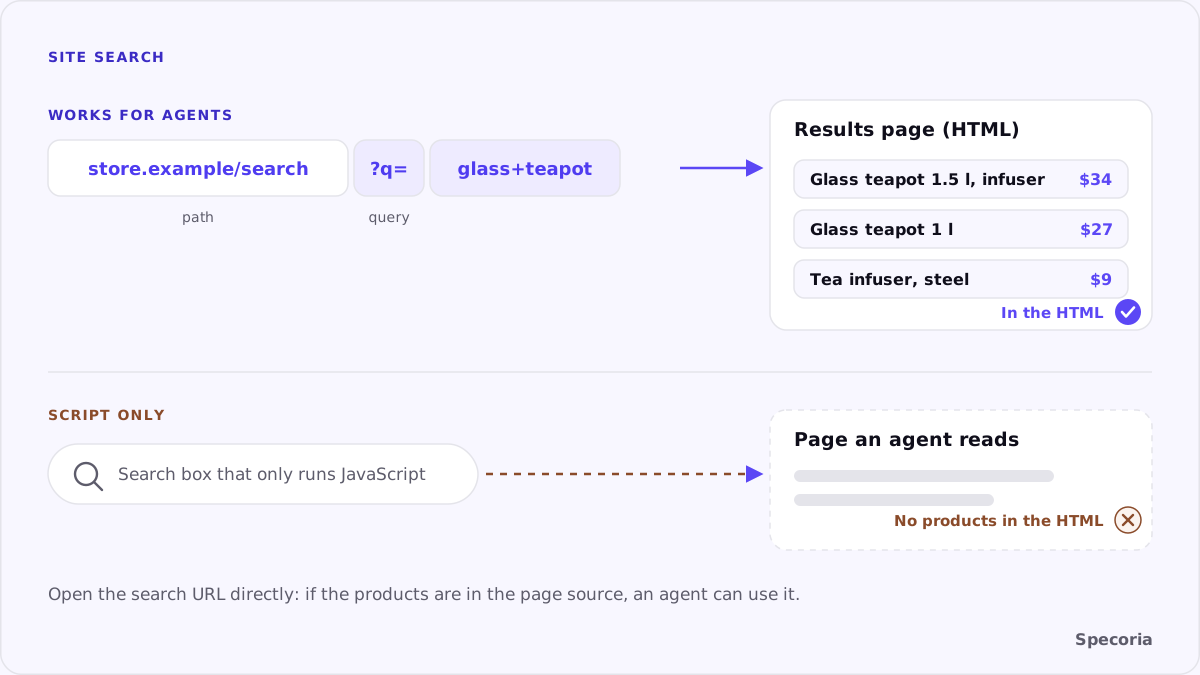
A search URL puts the query in the address, for example https://store.example/search?q=glass+teapot. Open it, and you get a results page. That one property does three things:
- A reading agent can search by building the URL itself, without a browser.
- Results can be shared and cached, so the same query returns the same page.
- The results page is just another page, so it can be server-rendered like a category page.
Most platforms already have one. The question is whether it works when opened directly, and whether the results arrive in the HTML.
Server-rendered results
A search URL is only useful if the page it returns contains the results. If the HTML arrives empty and the product list is filled in by JavaScript after a call to a search service, an agent that reads HTML sees a page with no products.
What to do: open your search URL with a common query, view the page source and look for the first product name and price. If they aren't there, ask your platform or search provider whether results can be rendered on the server, or whether a fallback list is available.
The search box
For agents that operate a browser, the search box itself matters:
- A real form. An input inside a
<form>that submits to the search URL, so Enter works. - A visible label or placeholder that says what it does.
- No search that only exists as an overlay opened by an icon with no text.
- Instant results are fine as long as Enter still goes to a full results page.
What about SearchAction markup?
Schema.org has a SearchAction type, and many sites still describe their search URL with it in WebSite markup. Google used it for the sitelinks search box, which it stopped showing in Search from November 21, 2024. Google said there is no need to remove the markup and that it won't cause errors. Whether agents read it isn't documented, so treat it as harmless documentation of your search URL, not as a substitute for one that works.
Small choices that help
- Synonyms and spelling. "Teapot" and "tea pot", "sneakers" and "trainers". Agents phrase queries the way shoppers do.
- Searchable identifiers. A search for a SKU, MPN or GTIN should return that product.
- Filters in the URL. If results can be filtered by size, color or price, put the filter in the address too.
- A useful zero-results page. Suggest categories or close matches as links, rather than a blank page.
A quick check
- Open
your-store/search?q=with a product name you sell, in a private window. - Confirm the page loads directly and lists that product.
- View the source and find the product's name and price in the HTML.
- Search for a SKU and a misspelling.
- Try the search box with the keyboard only: type, press Enter, land on results.
The bottom line
Site search is where an agent goes when your menus don't lead it to the product. Give it a search URL that works when opened directly, results that arrive in the HTML and a search box that is a real form. Those three things turn your search into a door an agent can use.
Specoria checks whether your site search works by URL and whether product pages and key actions are readable without JavaScript. Start with a free readiness test.
Sources
- Google Search Central Blog, Farewell, Sitelinks Search Box, October 21, 2024.
- Schema.org, SearchAction, accessed October 22, 2026.
- Specoria Insights, How to make product pages machine-readable