
You lowered the price of your best-selling coffee machine this morning. For the next few days, an assistant that answers "where can I buy it cheapest?" may still quote yesterday's price, because the crawler that feeds it hasn't come back to your page yet. How quickly it comes back depends partly on what your sitemap tells it.
In this article, we look at what a sitemap does for a store, what Google says about the lastmod date and how to keep it honest when prices and stock change every day.
What a sitemap is for
A sitemap lists the URLs you want crawlers to know about, with optional information about each one. For a store, that means product pages, category pages and policy pages. It doesn't replace good links between pages, but it helps crawlers find pages deep in a catalog and notice which ones changed.
Search engines use sitemaps, and many AI answers are built on search indexes. Whether a particular AI crawler reads your sitemap directly isn't always documented. Either way, a sitemap that tells the truth about which pages changed helps every crawler that does.
What Google uses, and what it ignores

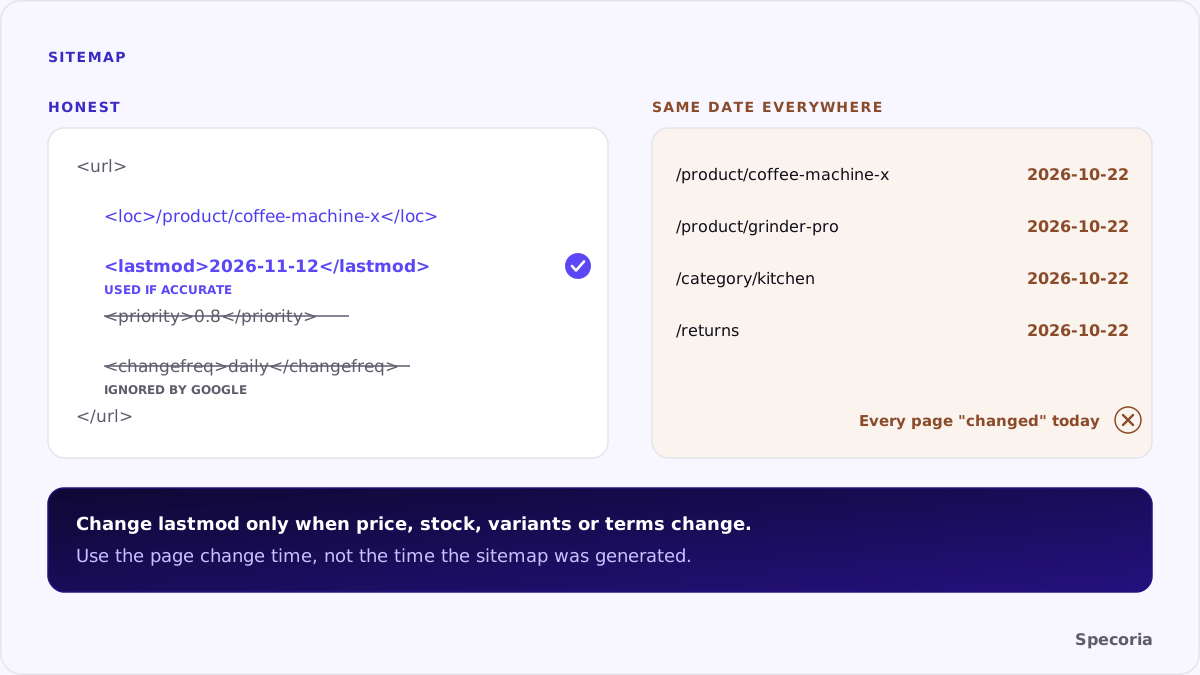
According to Google's Search Central documentation:
- Google ignores
priorityandchangefreq. You can leave them out. - Google uses
lastmodif it is consistently and verifiably accurate, for example when it matches the page's actual last change. lastmodshould reflect the last significant update. Changes to the main content, the structured data or the links on the page generally count; a new copyright year doesn't.- Size limits. One sitemap can hold up to 50,000 URLs or 50 MB uncompressed. Larger catalogs split into several sitemaps, listed in a sitemap index.
The sitemaps protocol adds one more rule: the date must be the date the page was last modified, not the date the sitemap was generated.
The most common mistake
Many platforms write the time the sitemap was generated into every lastmod. Every page appears to change every day, which is the same as saying nothing. A crawler that checks a few of those pages and finds them unchanged has every reason to stop trusting the dates.
The opposite mistake is just as common: no lastmod at all, or a date that never updates, so a real price change is invisible.
What counts as a change for a store
For a product page, a significant update is one a shopper or an agent would care about:
- Price changed, including a sale starting or ending.
- Availability changed: in stock, out of stock, back in stock.
- Variants added or removed.
- Delivery or return terms on the page changed.
- Description, images or specifications changed in substance.
A new related-products carousel, a rotated banner or a session token in the HTML doesn't count.
How to keep lastmod honest
- Store a last-changed time per product, updated only when one of the fields above changes.
- Write that time into the sitemap, not the time the file was generated.
- Use the same time in your structured data's
dateModifiedif you publish one. - Remove pages that no longer exist, and make sure every URL in the sitemap returns 200 and is the canonical version.
- Split large catalogs by type (products, categories, policies) so changes are easy to see.
- Point to the sitemap from robots.txt with a
Sitemap:line.
We do this on our own site: each page's lastmod is taken from a record that changes only when the page's content changes.
Filters, pagination and discontinued products
A store's catalog creates many URLs that don't belong in a sitemap:
- Filter and sort URLs, such as
?color=red&sort=price. List the canonical category page instead. - Session or tracking parameters. A sitemap lists clean, canonical URLs only.
- Out-of-stock products that will return. Keep them listed, with availability updated on the page and a
lastmodthat reflects the change. - Discontinued products. Remove them from the sitemap, and decide what the URL does: point it to the closest replacement or return a clear "not found".
Google's documentation also describes extensions for images and other media. For a store with good product photography, an image sitemap can help those images get found.
The bottom line
A sitemap doesn't make crawlers come back; honest dates give them a reason to. Leave out priority and changefreq, write a lastmod that changes only when price, stock, variants or terms change, and keep every listed URL live and canonical. For a store whose prices move daily, that is how the next crawl finds today's price instead of yesterday's.
Specoria checks whether your store publishes a sitemap and whether your product pages can be indexed. Start with a free readiness test.
Sources
- Google Search Central, Build and submit a sitemap, last updated July 8, 2026.
- Sitemaps.org, Sitemaps XML format, accessed October 22, 2026.