
A shopper asks an assistant for a store that sells a specific espresso grinder. Two stores have it at the same price. One shows a company name, a street address, a phone number and a VAT number in its footer and in its structured data. The other shows a logo and a contact form. Which one would you recommend if you were the assistant and had to stand behind the answer?
Agents can't walk into a shop. They decide whether a store is real and accountable from what it publishes about itself. In this article, we look at which facts make up a store's identity, where an agent reads them and how to keep them consistent.
Why identity matters to an agent
An agent that sends a shopper to a store, or completes a purchase there, is making a recommendation. Several of the platforms we have covered say the store remains the merchant of record. That makes the store's identity part of the purchase: it is who the shopper pays, who issues the invoice and who handles a return. We covered that side in merchant of record and the customer relationship.
Identity also answers simpler questions an agent gets asked: "Is this store in my country?", "Can I call them?", "Who do I contact about a return?"
The facts that make up an identity

- Trading name and legal name. The name shoppers know, and the registered name on invoices if it is different.
- Address. A real postal address with a country.
- Contact. A phone number with country code and an email for customer service.
- Tax or company identifiers. A VAT number, tax ID or an international identifier such as a LEI, DUNS or GLN.
- Policies. Return and shipping terms that apply across the store.
- Profiles. Official profiles elsewhere that confirm the same business.
Where an agent reads them
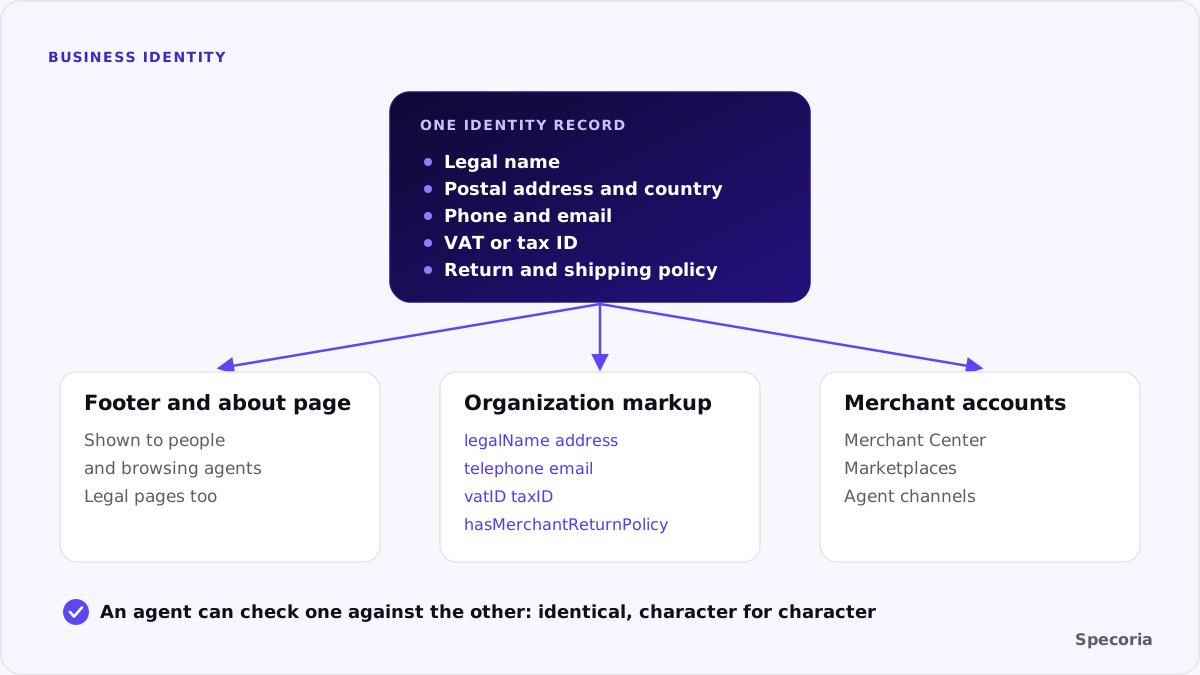
On your pages. Footer, about page, contact page and legal pages. This is what a browsing agent and a person both see.
In Organization markup. Google's documentation recommends adding Organization structured data to your home page. It has no required properties; Google recommends adding as many as apply. They include name, legalName, url, logo, address, contactPoint, telephone, email, sameAs, vatID, taxID and iso6523Code. Google calls the VAT code an important trust signal, because people can look a business up in public VAT registries. The same markup can hold store-wide policies with hasMerchantReturnPolicy and hasShippingService.
In your merchant accounts. Merchant Center, marketplaces and agent channels hold their own copy of your business details.
Keep them identical
The problem is rarely a missing fact. It is three versions of it. The footer says one company name, the markup another, the merchant account a third. The address on the contact page is the old one. The phone number in the markup has no country code.
What to do: write one identity record and copy it everywhere, character for character:
- Legal name exactly as registered, and the trading name if different.
- One postal address in a fixed format, with country.
- A customer service phone number with country code, and an email address on your own domain.
- Your VAT or tax number. Google's guidance is to make sure
taxIDmatches the country in your address. - Links to official profiles you control, in
sameAs.
Then check the footer, about page, contact page, Organization markup and every merchant account against that record.
Turkish stores have a head start
Turkish distance-selling pages already list the seller's title, address and contact details, because the pre-contract information requires them. The work is mostly to make the same facts machine-readable: mark them up in Organization structured data on the home page and keep them identical to the legal pages.
Common mistakes
- Identity only in an image. A footer logo with the address baked in can't be read.
- A contact form with no address or phone. The agent can't tell whether a real business is behind it.
- Organization markup copied from a template, still carrying the example company's name.
- Different legal names on the invoice, the legal pages and the markup.
- Policies that differ between the Organization markup and the product pages.
The bottom line
An agent recommends stores it can account for. A legal name, address, contact details, tax ID and policies, stated identically on your pages, in your Organization markup and in your merchant accounts, give it the facts to check. It is one of the cheapest trust signals a store can send, and one of the most often inconsistent.
Specoria checks whether your business identity is published and machine-readable, and whether your legal pages are present. Start with a free readiness test.
Sources
- Google Search Central, Organization (Organization) structured data, last updated September 8, 2026.
- Specoria Insights, Merchant of record and the customer relationship